A teardown of how Default positions itself as the infrastructure layer for AI-powered go-to-market teams.
Who should read this teardown?
Best for
✓ SaaS founders
✓ Marketing leaders
✓ Product marketers
✓ Growth teams
✓ Website redesign projects
Executive Summary
Default is an AI infrastructure platform built for modern go-to-market teams. Rather than positioning itself as another AI assistant or workflow automation tool, the homepage consistently frames the product as the operational foundation that AI agents need to work reliably across sales, marketing, and revenue operations.
What makes the homepage particularly effective is its commitment to a single narrative. Every major section from the hero message to governance, security, and customer proof reinforces the idea that successful AI adoption requires unified data, shared workflows, and operational control rather than isolated AI features.
The homepage also reduces enterprise buying anxiety exceptionally well. Instead of simply demonstrating capabilities, it addresses common concerns around trust, governance, approvals, version history, and security before they become objections.
The main weakness is that the messaging assumes a relatively sophisticated audience. Visitors unfamiliar with concepts such as RevOps, identity resolution, or AI agents may struggle to understand the product quickly, creating friction for colder traffic.
Overall, Default delivers a homepage that prioritizes positioning, trust, and buyer confidence over feature promotion. It offers valuable lessons for SaaS founders looking to communicate complex products without relying on generic AI messaging.
Homepage at a Glance
| Category | Score | Why |
| Positioning | 9.8/10 | Clear category creation and differentiation. |
| Messaging Clarity | 8.8/10 | Strong for the target audience, but assumes prior knowledge. |
| Visual Hierarchy | 9.5/10 | Excellent flow and emphasis on key messages. |
| Trust Building | 10/10 | Security, governance, customer logos, and testimonials are woven throughout the page. |
| Product Demonstration | 9.6/10 | Screenshots actively support the narrative rather than decorate it. |
| CTA Strategy | 9.0/10 | Consistent and unobtrusive “Request a Demo” calls to action. |
Overall Rating
9.5/10
Why this Score?
Rather than competing on AI hype or feature quantity, Default positions itself as the infrastructure layer that enables reliable AI adoption across go-to-market teams. The homepage demonstrates a clear understanding of enterprise buying psychology, reducing uncertainty before asking visitors to request a demo. While some messaging may feel advanced for less technical buyers, the overall execution is highly cohesive and strategically focused.
Who Default Is Really Selling To
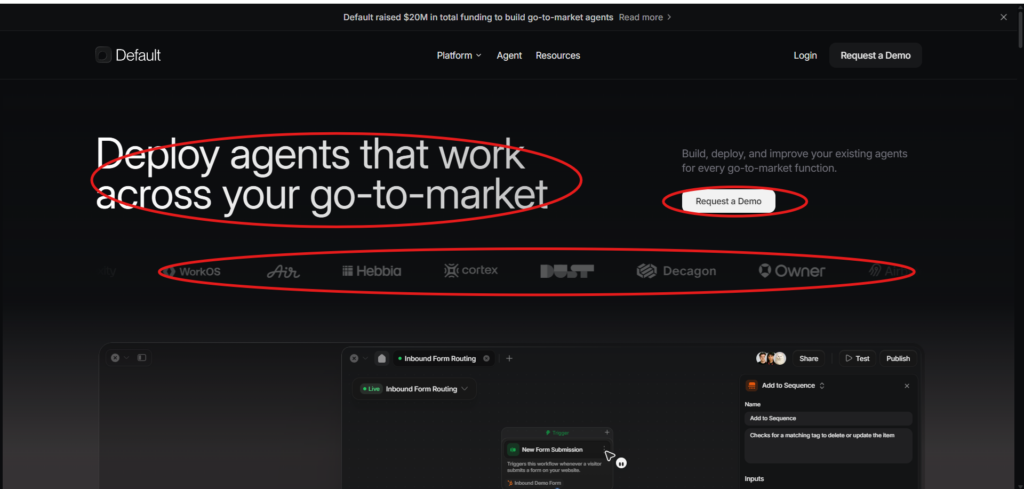
One of the strongest aspects of Default’s homepage is that it doesn’t attempt to appeal to every visitor. Instead, it immediately signals who the product is designed for and, just as importantly, who it isn’t.
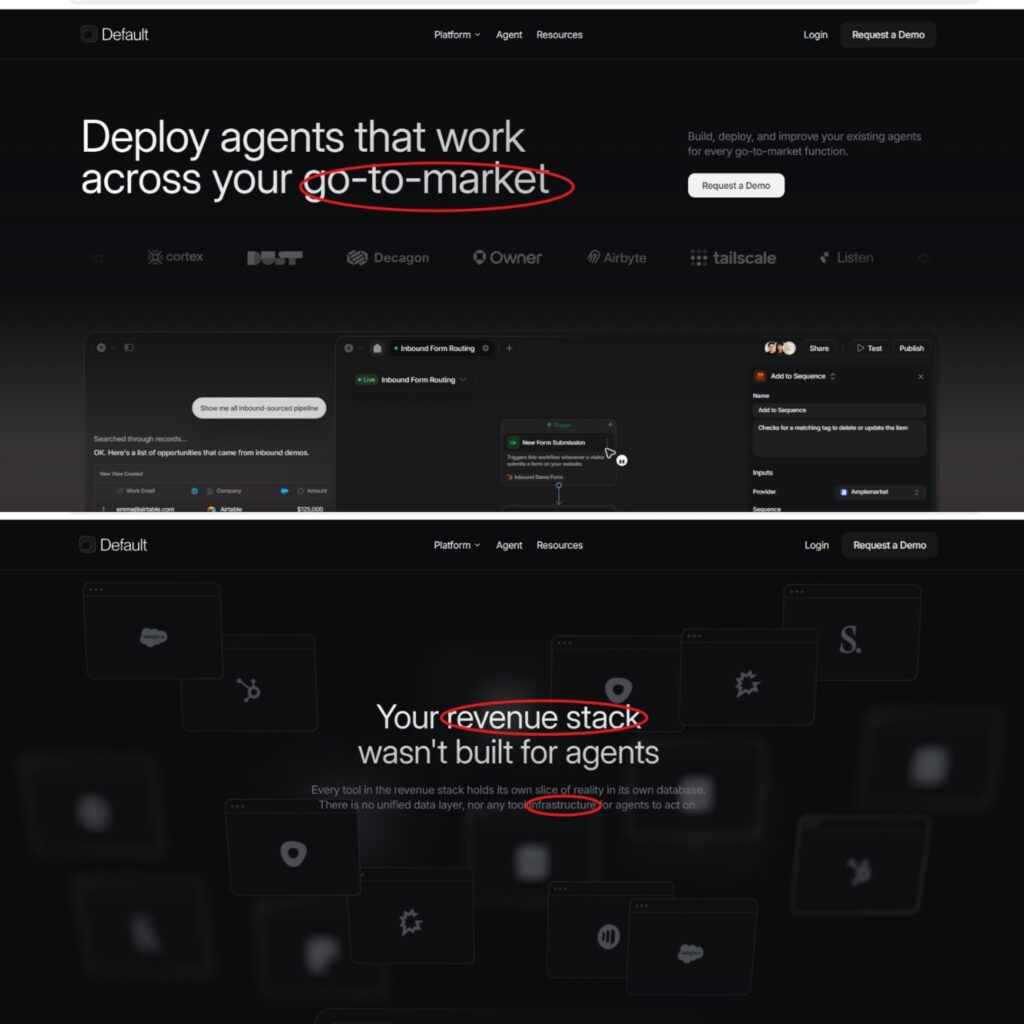
The hero headline, “Deploy agents that work across your go-to-market,” assumes familiarity with AI agents and go-to-market operations. Rather than explaining foundational concepts, Default speaks directly to teams already exploring AI adoption within revenue operations.
Supporting elements reinforce this positioning. The “Request a Demo” call-to-action suggests an enterprise sales process rather than a self-serve product, while recognizable customer logos provide immediate credibility for experienced buyers evaluating enterprise software.
This level of specificity helps filter visitors naturally. Qualified buyers are more likely to continue exploring because the messaging reflects their existing challenges and vocabulary. At the same time, less technical or early-stage visitors may quickly realize the product isn’t built for their current needs.
Many SaaS companies try to broaden their appeal by simplifying every message. Default takes the opposite approach. By speaking confidently to a narrower audience, it strengthens relevance for the customers most likely to convert.
Key Takeaway
Great positioning isn’t about making everyone feel included. It’s about making the right buyer feel understood.
The Homepage Creates a New Category Instead of Competing in an Existing One
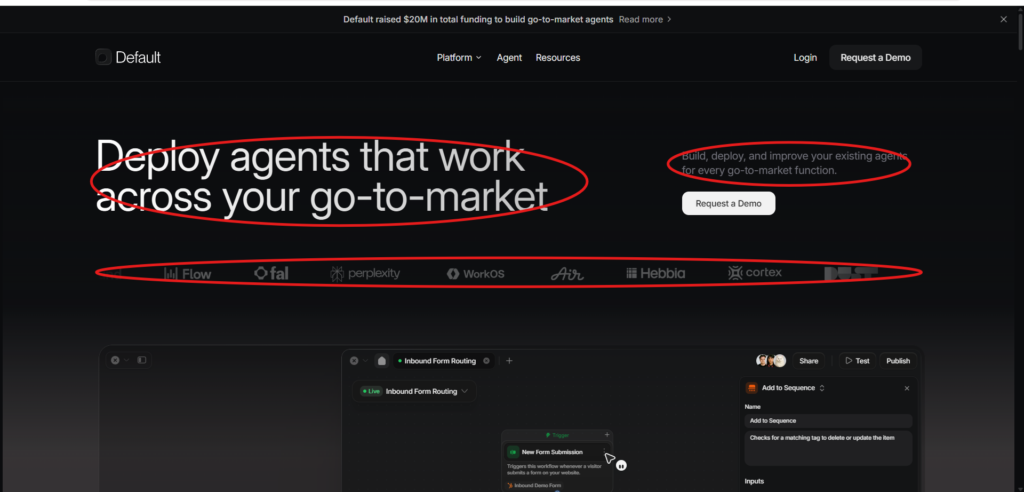
Observation
Instead of introducing itself as another AI tool, CRM extension, or workflow automation platform, Default immediately positions itself around a broader problem: helping companies deploy AI agents across their entire go-to-market operation.
This framing is important because it avoids competing directly with dozens of AI assistants and automation tools. Rather than selling a single feature, the homepage introduces a larger category centered on operational AI infrastructure.
Why It Works
Most SaaS homepages answer:
“What does our product do?”
Default answers a different question:
“What new category should buyers believe in?”
By defining the conversation around AI infrastructure rather than AI features, the company shifts attention away from feature comparisons and toward strategic positioning.
Instead of evaluating whether Default has more features than competitors, buyers begin evaluating whether their existing systems are capable of supporting AI agents effectively.
This is a much stronger conversation for an enterprise product.
Potential Friction
The messaging assumes visitors already understand concepts like AI agents and go-to-market operations.
For buyers who are earlier in their AI adoption journey, the value proposition may feel abstract until they continue further down the page.
Takeaway for SaaS Founders
Winning companies don’t always compete inside existing categories. Sometimes they create a new way for buyers to think about the problem.
The Homepage Sells the Problem Before Explaining the Product
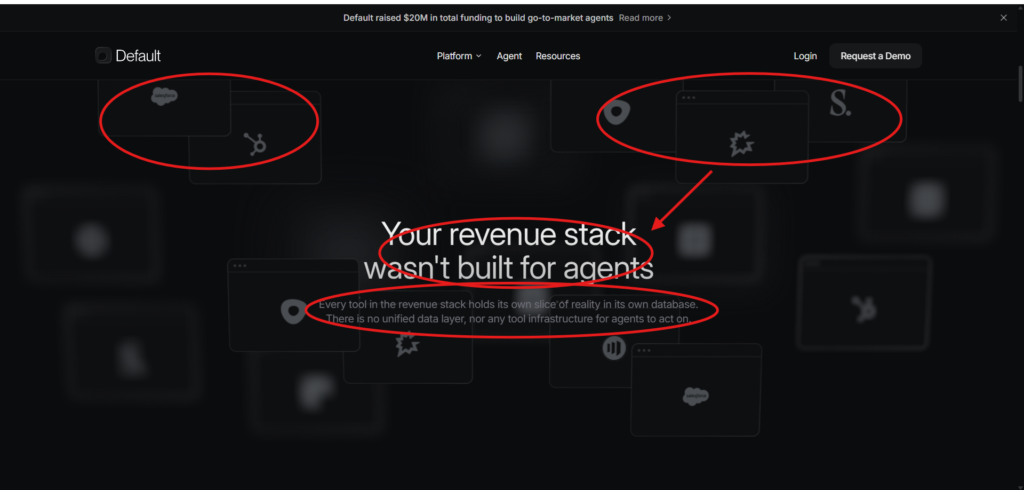
Observation
Rather than immediately explaining how the platform works, Default first convinces visitors that their existing revenue stack has a structural limitation.
The headline reframes disconnected software as an obstacle to successful AI adoption, encouraging buyers to rethink the problem before evaluating any solution.
Why It Works
Many SaaS companies introduce their product before establishing why change is necessary.
Default reverses that order.
Instead of saying,
“Here’s our platform.”
it first says,
“Here’s why your current approach won’t work.”
Once buyers accept that premise, the platform becomes the logical next step rather than just another software option.
This is classic problem-first messaging.
Potential Friction
The argument relies on visitors already believing that AI agents are strategically important.
Companies not yet investing in AI may not immediately relate to the problem being presented.
Takeaway for SaaS Founders
The strongest product explanation often begins by redefining the buyer’s problem, not by describing the product itself.
Every Section Builds Toward One Unified Narrative
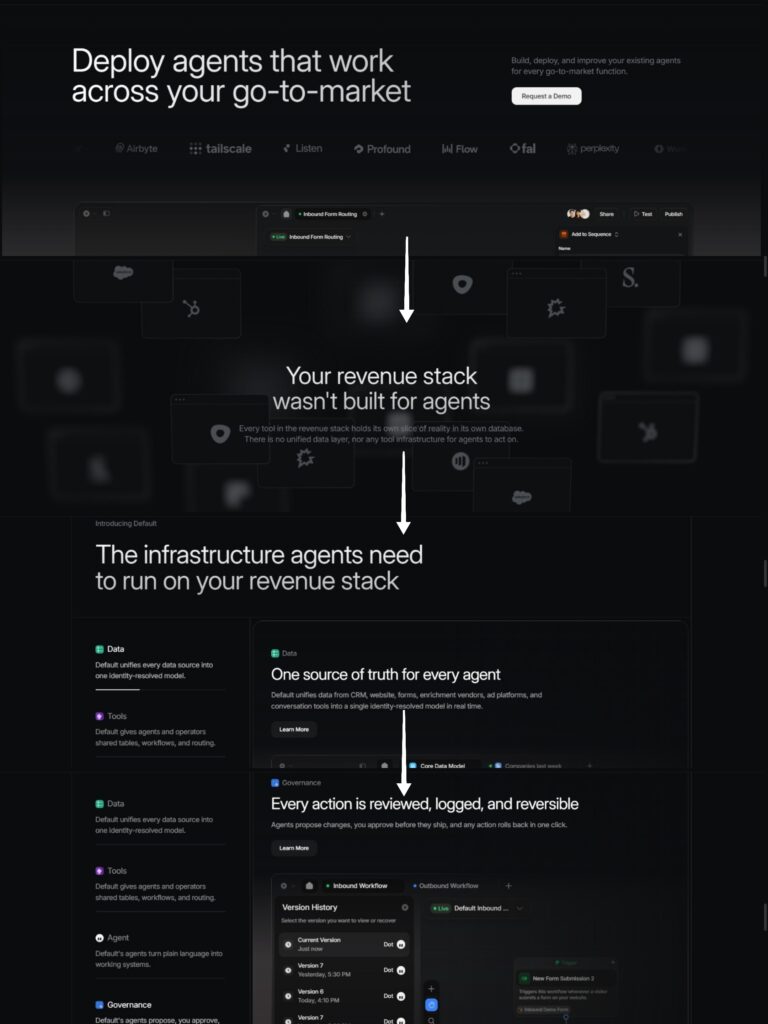
Observation
One of the homepage’s greatest strengths is its narrative consistency.
Each section answers a different buyer question while reinforcing the same central message: AI agents require reliable infrastructure to operate effectively.
Rather than introducing unrelated features as visitors scroll, every section advances the story in a logical sequence.
The homepage moves from defining the problem to presenting the solution, demonstrating capabilities, reducing risk, and finally reinforcing trust through customer validation.
Why It Works
Many SaaS homepages feel like collections of independent feature blocks.
Default feels like a guided conversation.
Each section prepares visitors for the next, reducing cognitive load and making the product easier to understand despite its complexity.
Instead of repeatedly asking buyers to process new ideas, the homepage continually reinforces a single overarching narrative.
This creates clarity, confidence, and momentum throughout the buying journey.
Potential Friction
The narrative is exceptionally cohesive, but it also requires visitors to continue scrolling before the complete value proposition becomes clear.
Users seeking an immediate explanation may find the messaging slower to unpack.
Takeaway for SaaS Founders
A homepage shouldn’t feel like a checklist of features. It should guide buyers through a logical sequence that transforms confusion into confidence.
Product Screenshots Answer Buyer Objections Instead of Showing Features
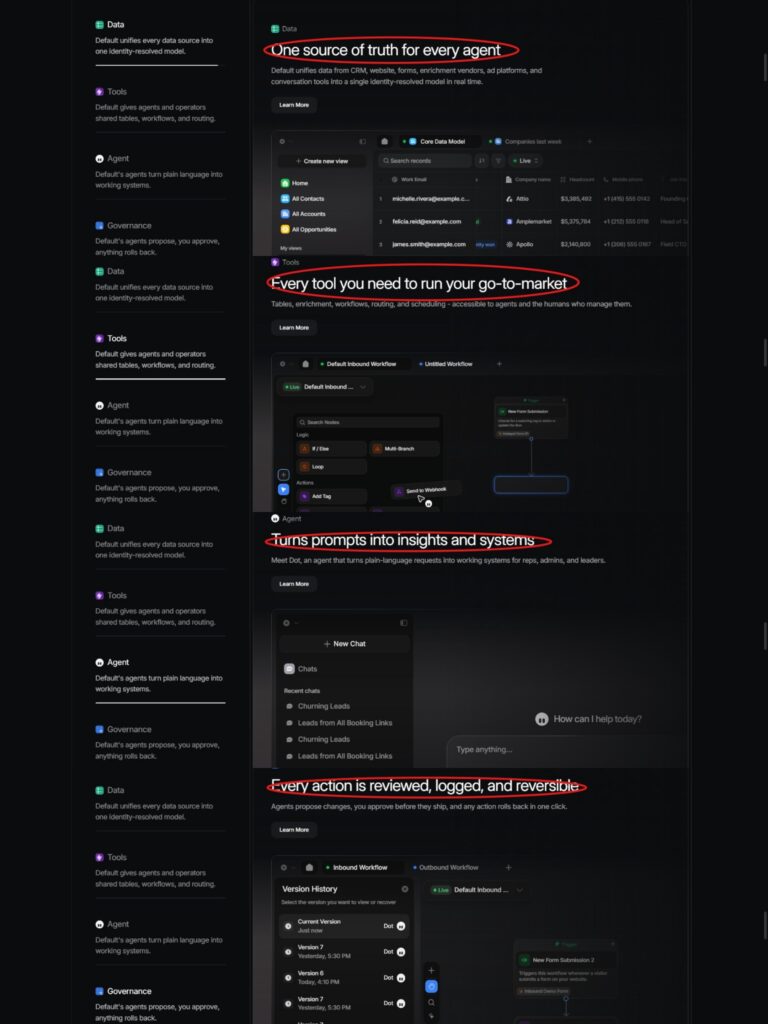
Observation
Many SaaS companies use product screenshots simply to prove that their software exists.
Default uses them differently.
Each product demonstration answers a specific question that enterprise buyers naturally ask during evaluation.
Rather than showing random parts of the interface, every screenshot supports the narrative established earlier on the page.
Why It Works
As visitors scroll, each product demonstration removes another layer of uncertainty.
The Data section answers:
“Can your platform unify information from different systems?”
The Tools section answers:
“Can my team actually operate inside this platform?”
The Agent section answers:
“How do people interact with AI?”
The Governance section answers:
“Can we trust AI in production?”
Instead of overwhelming buyers with dozens of features, the homepage gradually replaces uncertainty with confidence.
By the time visitors reach the lower half of the page, many of their biggest concerns have already been addressed.
Potential Friction
The interface demonstrations assume buyers already understand the operational value of these workflows.
Less experienced visitors may recognize the interface without immediately understanding why each capability matters.
Takeaway for SaaS Founders
Every product screenshot should answer a buyer objection not simply display your interface.
Trust Is Built Continuously, Not Saved for the End
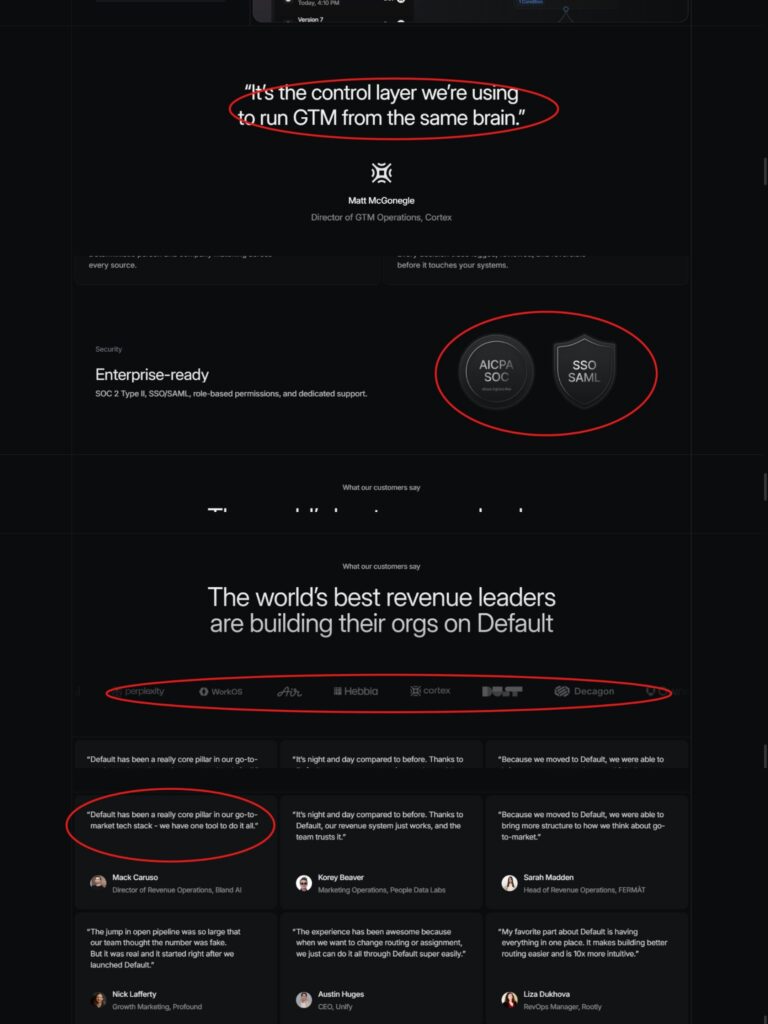
Observation
Many SaaS websites place all of their trust signals near the bottom of the homepage.
Default distributes credibility throughout the entire experience.
From recognizable customer logos near the hero section to governance features, security certifications, executive testimonials, and customer success stories, trust is reinforced at multiple points rather than introduced all at once.
Why It Works
Enterprise software purchases are rarely based on features alone.
Buyers continuously ask themselves questions like:
- Can I trust this company?
- Will this scale?
- Will leadership approve this purchase?
- Is this secure?
- Do companies like mine already use it?
Default answers these questions before they become objections.
Instead of waiting until the end of the page to establish credibility, trust is layered into the buying journey from beginning to end.
Potential Friction
The homepage relies heavily on logos and testimonials from modern technology companies.
Visitors from more traditional industries may find fewer examples that directly reflect their own business context.
Takeaway for SaaS Founders
Trust should grow alongside interest. Don’t wait until the bottom of your homepage to prove credibility.
Every Feature Reinforces One Positioning Statement
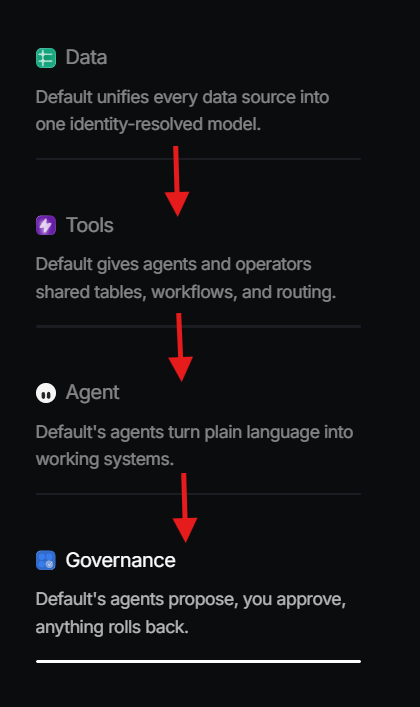
One Platform. Four Supporting Capabilities.
Observation
One of the most impressive aspects of Default’s homepage is its messaging discipline.
Every major capability supports the same positioning statement introduced at the top of the page.
Instead of presenting disconnected features, each section explains another component required to operate AI agents across an organization’s go-to-market function.
Nothing feels unnecessary or off-topic.
Why It Works
Many SaaS homepages gradually lose focus as they introduce additional features.
The result is a collection of unrelated selling points that compete for attention.
Default avoids this by organizing its messaging around a single central idea.
Each capability naturally builds upon the previous one.
Data enables better tools.
Tools enable intelligent agents.
Agents require governance.
Governance creates enterprise confidence.
Rather than expanding sideways into new ideas, the homepage continues strengthening its original promise.
This consistency makes the platform easier to understand despite its technical complexity.
Potential Friction
Because the homepage maintains such a narrow narrative, visitors looking for specific feature comparisons or pricing-related information may need additional exploration before finding the answers they’re looking for.
Takeaway for SaaS Founders
The strongest homepages don’t introduce new stories as visitors scroll they deepen the original one.
Where Conversion Friction Still Exists
Despite being one of the strongest AI SaaS homepages I’ve reviewed, there are still a few areas where friction could quietly reduce conversions.
The biggest isn’t the copy.
It’s the assumptions the copy makes about the visitor.
Throughout the homepage, terms like go-to-market, agent infrastructure, identity-resolved data, routing, and governance appear naturally.
For experienced RevOps teams, these ideas feel familiar.
For buyers earlier in their AI journey, they require interpretation before the product’s value becomes obvious.
That doesn’t necessarily mean the messaging is wrong.
In fact, it may be a deliberate positioning decision.
The homepage appears designed to qualify sophisticated buyers rather than educate newcomers.
The trade-off is that some visitors who could eventually become ideal customers may leave before they fully understand the opportunity.
A small amount of additional context around these concepts could make the homepage more accessible without weakening its enterprise positioning.
Takeaway for SaaS Founders
Positioning for experts is powerful, but remember that every new category also requires education.
Lessons SaaS Founders Can Learn
Default’s homepage isn’t successful because it has beautiful visuals or clever copy.
It’s successful because every messaging decision supports the same strategic objective.
Here are five lessons every SaaS founder can apply.
1. Sell a Category Before Selling Features
Instead of competing feature-for-feature, help buyers rethink the problem you’re solving.
The strongest positioning changes how buyers evaluate the market.
2. Build a Narrative, Not a Feature List
Every homepage section should answer the buyer’s next question.
Avoid introducing disconnected ideas that compete for attention.
3. Every Screenshot Should Remove Doubt
Don’t show your interface simply because it looks good.
Show it because it answers a buyer objection.
4. Build Trust Throughout the Journey
Trust shouldn’t appear only before the footer.
Security, customer proof, governance, and testimonials should reinforce confidence from beginning to end.
5. Speak Clearly to Your Ideal Buyer
Trying to appeal to everyone usually weakens your positioning.
The more specifically you communicate with your ideal customer, the easier it becomes for them to recognize themselves in your message.
Final Verdict
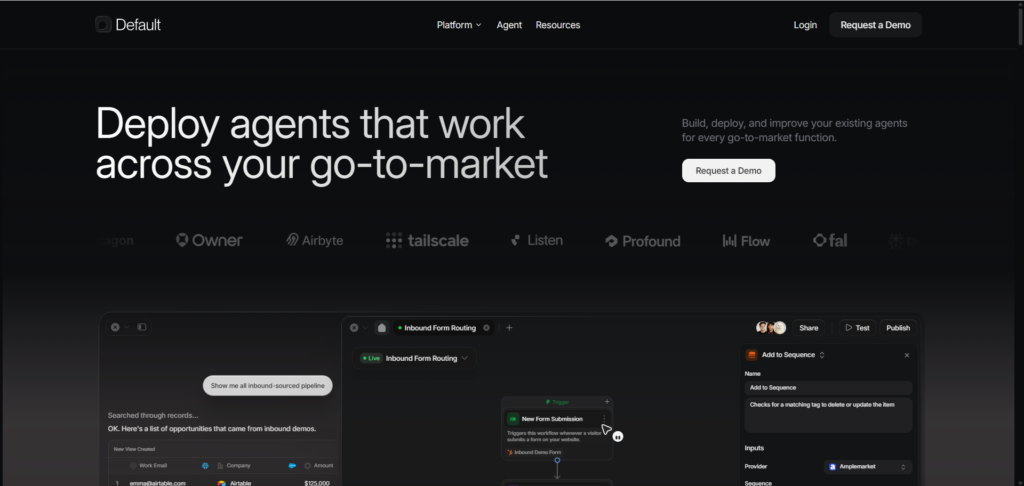
Default has built one of the strongest AI SaaS homepages I’ve reviewed.
Rather than competing on AI hype, feature quantity, or automation claims, the homepage consistently positions the platform as the infrastructure required to deploy AI agents across an entire go-to-market organization.
Every major section contributes to that story.
Instead of introducing unrelated features, the homepage guides visitors through a logical progression that explains the problem, establishes the solution, reduces implementation risk, and reinforces trust.
The primary opportunity lies in making the category slightly easier for less sophisticated buyers to understand.
Beyond that, this homepage demonstrates an impressive level of messaging discipline that many SaaS companies could learn from.
Request Your Own Homepage Review
Every homepage tells a story.
The question is whether it’s the story your buyers actually understand.
Sometimes the biggest conversion opportunities aren’t hidden in your design or your copy. They’re found in the way your product is positioned, how your message unfolds, and the moments where buyers quietly hesitate before taking the next step.
If you’re wondering whether your homepage is creating that kind of friction, I’d be happy to take a look.
Every homepage review includes:
✓ Messaging clarity analysis
✓ Buyer journey breakdown
✓ Conversion friction points
✓ Homepage wireframe recommendations
✓ Practical changes you can implement immediately